svg-diagram
Agent skill that draws architecture, flowchart, sequence, data-flow and lifecycle diagrams as hand-placed SVG, to one linted house style.
svg-diagram
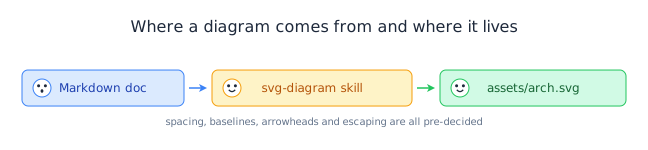
A house style for hand-written SVG diagrams your agent can follow — the layout arithmetic, the colour system, and a zero-dependency linter that proves it did.
Install
Paste this to your coding agent:
Install the svg-diagram skill from https://github.com/bybit-exchange/svg-diagram
for me by running: npx skills add bybit-exchange/svg-diagram -g
Or run it yourself:
npx skills add bybit-exchange/svg-diagram -g
The CLI detects which agents you have installed and writes each one's path. Drop -g to install into the current project instead.
| Surface | Path |
|---|---|
| Claude Code | ~/.claude/skills/svg-diagram/ |
| Codex, Cursor, Gemini CLI, Copilot, opencode, Antigravity | ~/.agents/skills/svg-diagram/ — they share one directory |
| Pi | ~/.pi/skills/svg-diagram/ |
| Windsurf, Continue, Roo, Goose, Kiro, Trae and 40+ more | ~/.<agent>/skills/svg-diagram/ |
| Claude.ai | Zip the folder and upload it under Settings → Capabilities → Skills (skill text only — svg-lint needs local Node) |
Every path is named from the skill's frontmatter name, not from where the skill sits here, so moving files in this repository doesn't change them.
SKILL.md is at the repository root, so the install copies the root and svg-lint comes along with the skill text. The linter has no dependencies, so it runs from wherever it landed:
node ~/.claude/skills/svg-diagram/tools/svg-lint/bin/svg-lint.mjs diagram.svg
If you only want the skill text, take the one file the agent reads:
mkdir -p ~/.claude/skills/svg-diagram
curl -fsSL https://raw.githubusercontent.com/bybit-exchange/svg-diagram/main/SKILL.md \
  -o ~/.claude/skills/svg-diagram/SKILL.md
The skill works on its own that way; svg-lint is what you give up.
Then start a new session and ask for a diagram — the agent should announce that it's using svg-diagram.
Gallery
Ten diagrams, all drawn under this skill and all lint clean. Each one is here for the rule it demonstrates.
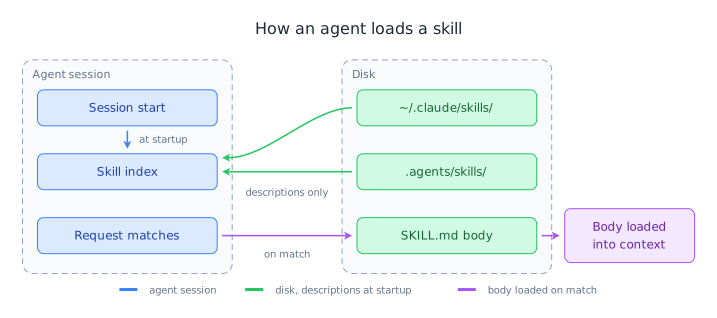
How an agent loads a skill
Two dashed containers side by side. Connectors cross the channel between them, and a colour change marks the point where a request matches.
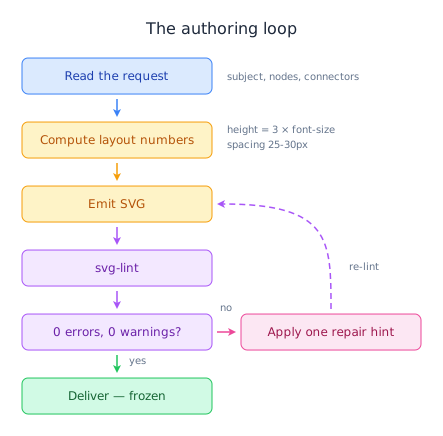
The authoring loop
A cross-layer loop-back line, painted after the boxes so they don't cover it.
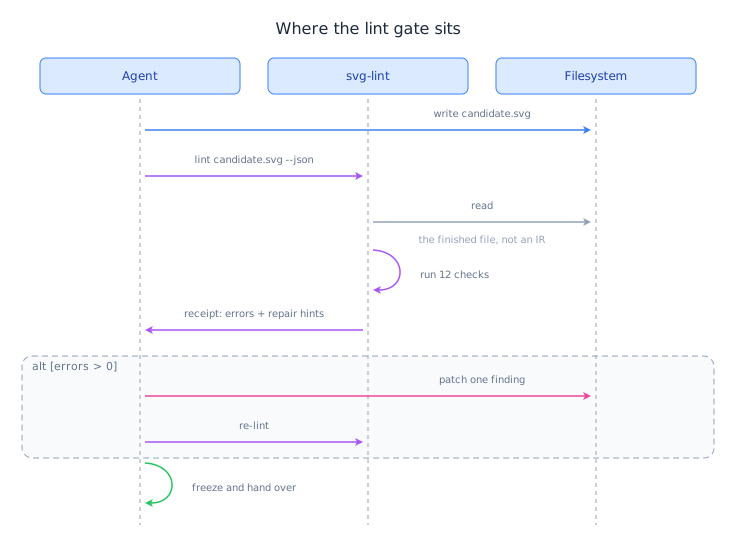
Where the lint gate sits
A self-call that leaves its lifeline and curves back to it, its second control point sharing the end point's y so the arrowhead closes level and points at the participant rather than down the lifeline.
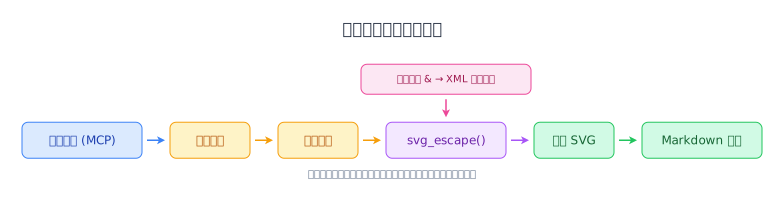
From a data API to a document figure
CJK labels sized from the CJK column of the width table — one full font size per character, 12px rather than 7.
The life of a skill in this repo
One semantic colour triple per state. Each forward arrow carries the colour of the state it leaves.
같은 카테고리 다른 리소스
Next.js
React 기반 풀스택 프레임워크. App Router와 서버 컴포넌트(RSC)가 사실상 표준이며, SSR·SSG·ISR을 한 프로젝트 안에서 다룬다.
shadcn/ui
복사·붙여넣기 방식의 React 컴포넌트 모음. npm 의존성이 아닌 코드 소유권 모델이라 커스터마이징이 자유롭다.
Supabase
PostgreSQL 기반 BaaS. Auth · Realtime · Storage · Edge Functions 통합.
Anthropic MCP
Claude가 외부 도구/데이터에 접근하도록 해주는 프로토콜 표준. 생태계의 근간.