Notion MCP
Notion 페이지·데이터베이스 CRUD를 AI로 처리한다. 회의록 정리, PRD 업로드, 문서 백로그 자동화에 활용도가 높다.
Claude가 Notion 문서를 직접 읽고 쓰게 해주는 공식 MCP. 기획 문서 정리 워크플로우에 상시 연결해 둔다.
Notion MCP Server
[!NOTE]
We’ve introduced Notion MCP, a remote MCP server with the following improvements:
- Easy installation via standard OAuth. No need to fiddle with JSON or API tokens anymore.
- Powerful tools tailored to AI agents, including editing pages in Markdown. These tools are designed with optimized token consumption in mind.
Learn more and get started at Notion MCP documentation.
We are prioritizing, and only providing active support for, Notion MCP (remote). As a result:
- We may sunset this local MCP server repository in the future.
- Issues and pull requests here are not actively monitored.
- Please do not file issues relating to the remote MCP here; instead, contact Notion support.
This project implements an MCP server for the Notion API.
⚠️ Version 2.0.0 breaking changes
Version 2.0.0 migrates to the Notion API 2025-09-03 which introduces data sources as the primary abstraction for databases.
What changed
Removed tools (3):
post-database-query- replaced byquery-data-sourceupdate-a-database- replaced byupdate-a-data-sourcecreate-a-database- replaced bycreate-a-data-source
New tools (7):
query-data-source- Query a data source (database) with filters and sortsretrieve-a-data-source- Get metadata and schema for a data sourceupdate-a-data-source- Update data source propertiescreate-a-data-source- Create a new data sourcelist-data-source-templates- List available templates in a data sourcemove-page- Move a page to a different parent locationretrieve-a-database- Get database metadata including its data source IDs
Parameter changes:
- All database operations now use
data_source_idinstead ofdatabase_id - Search filter values changed from
["page", "database"]to["page", "data_source"] - Page creation now supports both
page_idanddatabase_idparents (for data sources)
Do I need to migrate?
No code changes required. MCP tools are discovered automatically when the server starts. When you upgrade to v2.0.0, AI clients will automatically see the new tool names and parameters. The old database tools are no longer available.
If you have hardcoded tool names or prompts that reference the old database tools, update them to use the new data source tools:
| Old Tool (v1.x) | New Tool (v2.0) | Parameter Change |
|---|---|---|
post-database-query | query-data-source | database_id → data_source_id |
update-a-database | update-a-data-source | database_id → data_source_id |
create-a-database | create-a-data-source | No change (uses parent.page_id) |
Note:
retrieve-a-databaseis still available and returns database metadata including the list of data source IDs. Useretrieve-a-data-sourceto get the schema and properties of a specific data source.
Total tools now: 22 (was 19 in v1.x)
Installation
1. Setting up integration in Notion
Go to https://www.notion.so/profile/integrations and create a new internal integration or select an existing one.
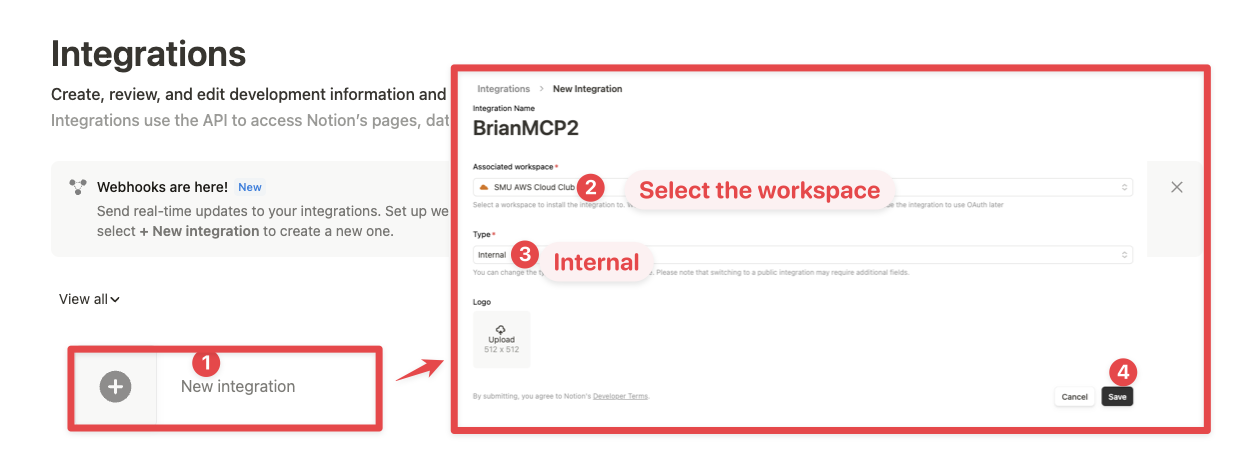
While we limit the scope of Notion API's exposed (for example, you will not be able to delete databases via MCP), there is a non-zero risk to workspace data by exposing it to LLMs. Security-conscious users may want to further configure the Integration's Capabilities.
같은 카테고리 다른 리소스
pm-claude-skills
Claude AI를 위한 전문 스킬 모음. 16개 직군에 걸친 135개 스킬로 주당 8~10시간을 절약합니다. PM은 Professional을 뜻합니다.
vibe-check
0에서 1을 만드는 경력 12년 프로덕트 매니저가 만든 스킬. 초보자를 막연한 아이디어에서 실현 가능한 계획으로 이끈 뒤, GitHub 기초, 클린 코드 습관, 검증과 반복 루프, 코드 점검까지 빌드 과정을 안내합니다. Claude Code, Codex, Antigravity에서 동작하며 grill-me는 엔지니어용, vibe-check은 그 외 모두를 위한 것입니다.
linear-claude-skill
Linear의 이슈, 프로젝트, 팀을 관리하는 에이전트 스킬. MCP 도구, SDK 자동화, GraphQL API 패턴을 제공합니다.
Linear
스타트업 표준 이슈 트래커. 빠르고 아름답고 의견이 강한 도구.